Podcaster Team Seats Permissions
Last updated: September 4, 2026
Learn all the ways a Team Seat role can interact with RedCircle!
Team Seats are an excellent way to grant multiple people access to the show(s) on your account. The feature allows for co-hosts, editors, producers, and other contributors to work on the show(s) without needing to share login credentials.
Each Team Seat comes with its own dedicated login. Each seat can be customized to the specific level of access desired for every member of your organization. But what exactly are those permissions? Well, wonder no more! This article was written to address that exact question.
Be sure to check out the Teams Seats Overview article to learn more about the feature and how to set it up for your account.
The Team Seats feature is available for those on the Pro Plan or higher.
Org Owner Permissions
The Org Owner, also known as the Primary Account Holder, is responsible for adding the various Team Seats members. They have full control and access over all shows present on the account.
Org Owner Podcast Permissions:
Create and/or Import New Podcasts
Redirect or Delete Podcasts
Edit Podcast Settings
View Shows and Episodes
Create/Edit Episodes and Episode Drafts
Publish Episodes
Upload Episode Audio
Configure Episode Insertion Points
Delete Episodes
Generate Embedded Players
Edit Podcast Distribution
Org Owner Monetization Permissions:
View Exclusive Content
Enable/Edit/Disable Exclusive Content
Export Exclusive Content Subscriber List
View and Manage RedCircle Ad Platform (RAP)
Org Owner Cross-Promotions Permissions:
View Cross-Promotions
Enable and Manage Cross-Promotions
Org Owner Dynamic Insertion Permissions:
View Dynamic Insertion Dashboard
Create Audio Files and Audio Blocks
Edit/Delete Audio Files and Audio Blocks
Bulk Assign Audio Blocks
Org Owner Reporting Permissions:
View Downloads Analytics
View Dynamic Insertion Analytics
View Revenue Analytics
View Money Page and Transactions
Org Owner Account Management Permissions:
View Account Profile
Connect/View Bank Account Info
Transfer Funds to Bank
Update Account Plan and Billing Information
Add/Delete a Team Seat
Customize Roles on a Team Seat
Update a Team Seat’s Access
Admin Permissions
The Admin role grants the second-highest level of permissions for a Team Seat. They can manage most aspects of all podcasts on the account, but are limited on the Account Management abilities.
Admin Podcast Permissions:
Redirect or Delete Podcasts (Permission can be removed by Org Owner)
Edit Podcast Settings
View Shows and Episodes
Create/Edit Episodes and Episode Drafts
Publish Episodes
Upload Episode Audio
Configure Episode Insertion Points
Delete Episodes
Generate Embedded Players
Edit Podcast Distribution
Admin Monetization Permissions:
View Exclusive Content
Enable/Edit/Disable Exclusive Content
Export Exclusive Content Subscriber List
View and Manage RedCircle Ad Platform (RAP)
Admin Cross-Promotions Permissions:
View Cross-Promotions
Enable and Manage Cross-Promotions
Admin Dynamic Insertion Permissions:
View Dynamic Insertion Dashboard
Create Audio Files and Audio Blocks
Edit/Delete Audio Files and Audio Blocks (Only for Audio Blocks they create)
Bulk Assign Audio Blocks
Admin Reporting Permissions:
View Downloads Analytics
View Dynamic Insertion Analytics
View Revenue Analytics
View Money Page and Transactions
Admin Account Management Permissions:
View Account Profile
Update a Team Seat’s Access (Only for podcasts they’re assigned the Admin role)
Contributor Permissions
The Contributor role is typically meant for the Podcast Host themselves. This particular role grants access to a fair number of permissions, but many of those can be removed by the Org Owner should they see fit.
Contributor Podcast Permissions:
Edit Podcast Settings
View Shows and Episodes
Create/Edit Episodes and Episode Drafts
Publish Episodes
Upload Episode Audio
Configure Episode Insertion Points
Delete Episodes (Permission can be removed by Org Owner)
Generate Embedded Players
Edit Podcast Distribution (Permission can be removed by Org Owner)
Contributor Monetization Permissions:
View Exclusive Content
Enable/Edit/Disable Exclusive Content(Permission can be removed by Org Owner)
Export Exclusive Content Subscriber List (Permission can be removed by Org Owner)
View and Manage RedCircle Ad Platform (RAP) (Permission can be removed by Org Owner)
Contributor Cross-Promotions Permissions:
View Cross-Promotions
Enable and Manage Cross-Promotions (Permission can be removed by Org Owner)
Contributor Dynamic Insertion Permissions:
View Dynamic Insertion Dashboard
Create Audio Files and Audio Blocks (Permission can be removed by Org Owner)
Edit/Delete Audio Files and Audio Blocks (Permission can be removed by Org Owner) (Only for Audio Blocks they create)
Bulk Assign Audio Blocks (Permission can be removed by Org Owner)
Contributor Reporting Permissions:
View Downloads Analytics
View Dynamic Insertion Analytics
View Revenue Analytics (Permission can be removed by Org Owner)
View Money Page and Transactions (Permission can be removed by Org Owner)
Contributor Account Management Permissions:
View Account Profile
Editor Permissions
The Editor role is pretty much what it sounds like; a role for the editor of your podcast(s). They’re able to edit the podcast, but are unable to take much action beyond that.
Editor Podcast Permissions:
Edit Podcast Settings (Permission can be removed by Org Owner)
View Shows and Episodes
Create/Edit Episodes and Episode Drafts
Publish Episodes (Permission can be removed by Org Owner)
Upload Episode Audio
Configure Episode Insertion Points
Generate Embedded Players
Editor Monetization Permissions:
No Permissions
Editor Cross-Promotions Permissions:
No Permissions
Editor Dynamic Insertion Permissions:
View Dynamic Insertion Dashboard
Editor Reporting Permissions:
View Downloads Analytics (Permission can be removed by Org Owner)
Editor Account Management Permissions:
View Account Profile
Viewer Permissions
Similar to the Editor role, the Viewer role can only really view podcasts and relevant information on the account. They’re not able to make any changes.
Viewer Podcast Permissions:
View Shows and Episodes
Viewer Monetization Permissions:
View Exclusive Content
View RedCircle Ad Platform (RAP)
Viewer Cross-Promotions Permissions:
View Cross-Promotions
Viewer Dynamic Insertion Permissions:
View Dynamic Insertion Dashboard
Viewer Reporting Permissions:
View Downloads Analytics
View Dynamic Insertion Analytics
View Revenue Analytics (Permission can be removed by Org Owner)
View Money Page and Transactions (Permission can be removed by Org Owner)
Viewer Account Management Permissions:
View Account Profile
No Access
This Team Seat is completely excluded from the show. They are not able to interact with, or even view, the specific podcast.
Email Notifications for Each Role
Different Team Seat roles receive different email notifications based on their permissions.
Org Owner
Account Management
Email Verification after Sign Up
Plan Upgrade
Plan Downgrade
Plan Payment Failed
Payment Method Missing
RAP-Specific
Show is Eligible for RAP
Brand Inquiry
Brand Inquiry Response Reminder
Invited to Host-Read Campaign
Accepts Host-Read Campaign
Advertiser Uploads Script
Advertiser Misses Script Deadline
Campaign Audio Uploaded
Reminders for Campaign
Ad Audio Swap Request
Ad Audio Swap Reminder
Ad Audio Swap Complete
Campaign Ended Early
Programmatic Payment
Host-Read Campaign Payment
Other Features
Cross-Promotion Invitation
Cross-Promotion Message Sent
Cross-Promotion Updated
Admin and Contributor with “Edit RAP” access
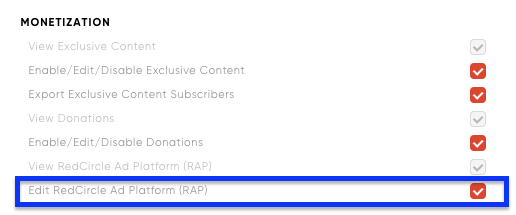
RAP-Specific
Show is Eligible for RAP
Brand Inquiry
Brand Inquiry Response Reminder
Invited to Host-Read Campaign
Accepts Host-Read Campaign
Advertiser Uploads Script
Advertiser Misses Script Deadline
Campaign Audio Uploaded
Reminders for Campaign
Ad Audio Swap Request
Ad Audio Swap Reminder
Ad Audio Swap Complete
Campaign Ended Early
Programmatic Payment
Host-Read Campaign Payment
Admin and Contributor with “Edit Cross-Promotions”

Other Features
Cross-Promotion Invitation
Cross-Promotion Message Sent
Cross-Promotion Updated
Every Role
Team Seat Added
Team Seat Deleted
Password Reset